An audit trail that holds up is designed before the first event is logged: you decide which actions need evidence, record who did what and when, make the record hard to alter, and set how long it is kept. For a SaaS company with 20 to 200 people, the hard part is rarely the database table. It is that CRM, finance tools, the product and now AI assistants all change data, and nobody owns the single record of those changes. At NordOps Consulting, we build the data foundation first, then the AI layer, then department agents, so every action an agent takes lands in one audit trail from day one.
TL;DR
- An audit trail is a chronological chain of records that lets you reconstruct a transaction from start to finish. A single system log is one input to it.
- Each event should record who acted, what changed (before and after), when, where from, and the result. Never record passwords, tokens or card data.
- Make the log insert-only, separate who can write, read and review it, and keep a copy in a separate security boundary.
- Set retention per purpose. The EU AI Act sets a floor of at least six months for logs of high-risk AI systems. GDPR sets no fixed number but expects no longer than necessary.
- AI agents that read and write business data need the same trail as people do, with approvals recorded.
Table of Contents
- What an audit trail is, and how it differs from system audit logs
- What each event should record
- A six-step implementation plan
- Retention: what the rules say
- Audit trails when AI agents act on your data
- Common mistakes
- Where NordOps Consulting fits
- Our perspective
- FAQ
- Sources
What an audit trail is, and how it differs from system audit logs
The terms get mixed up, so settle them first. NIST’s glossary defines an audit trail as a chronological record of system activities sufficient to reconstruct and examine the sequence surrounding a security-relevant transaction, from inception to results. An older NIST bulletin describes it as a series of records of computer events about an operating system, application or user activities, and says each record should specify when the event occurred, the user ID, the program or command used and the result.
In practice:
- System logs help engineers troubleshoot. They capture infrastructure and application events and are often rotated or sampled.
- Audit logs document historical activity for accountability. According to Datadog’s reference on audit logging, they differ from regular system logs in content, purpose and immutability, and aim to be unalterable by any user or service.
- The audit trail is the layer above: several logs correlated so that one business transaction, such as an invoice approval or a plan downgrade, can be followed across systems.
For a SaaS leader the distinction matters because an auditor, a customer’s security review or a regulator asks about transactions, not about servers. “Show me everything that happened to this customer’s contract and who approved the discount” is a trail question. A single log rarely answers it.
What each event should record
Start from the questions the trail must answer later. Indiana University’s IT-12 standard puts it as four elements: when (a timestamp with UTC offset), what (the action and the resource identifier), who (an account or session traceable to an individual) and where (for example an IP address). NIST control AU-03, as published by the Texas A&M System cybersecurity catalog, adds the source and the outcome of the event.
A practical event record for a SaaS company looks like this:
| Field | Example | Why it matters |
|---|---|---|
| Actor | User ID, plus type (employee, support, system job, API key, AI agent) | Separates human from automated action |
| Action | invoice.approve |
A consistent code makes searching possible |
| Target | Record type and ID | Links the event to the transaction |
| Change | Field, old value, new value | Shows what actually moved |
| Context | IP address, request ID, tenant | Ties events across systems |
| Time | Server timestamp in UTC | Avoids disputes about order |
| Result | Success, failure, reason | Failed attempts are evidence too |
The action-code, before-and-after and tenant fields follow the structure described in a SaaS audit log design guide, which also notes that an entry should be written in the same database transaction as the change itself, so a change cannot exist without its record.
What to keep out of the log
The same guide, citing OWASP, lists what should never be written directly: passwords, session identifiers, access tokens, encryption keys and payment card data. For a changed password, log that it changed, not the value. Indiana University’s standard also prohibits connection strings and information that is illegal to collect in the relevant jurisdiction. NIST’s AU-03 guidance adds that you must consider how audit records can reveal personal data, especially if the trail records inputs or usage patterns. In Europe that point is a GDPR matter: a log full of customer details is itself a processing activity.
A six-step implementation plan
This is the routine we would follow with a SaaS team. It draws on a reference pipeline from H-Studio Berlin’s guide to auditable architecture and on the controls cited throughout this article.
1. Decide what needs evidence
List the actions where someone may later ask “who did that?”: changing pricing or discounts, approving invoices or refunds, editing customer records, exporting data, changing permissions, provisioning access. For each, write down the purpose, the events, the required fields, who may write, read and export, how tampering is prevented, how fast an investigation must be, and when records are deleted. The H-Studio guide recommends answering these seven questions before choosing any tooling, and warns that an oversized trail can itself become a security and privacy liability.
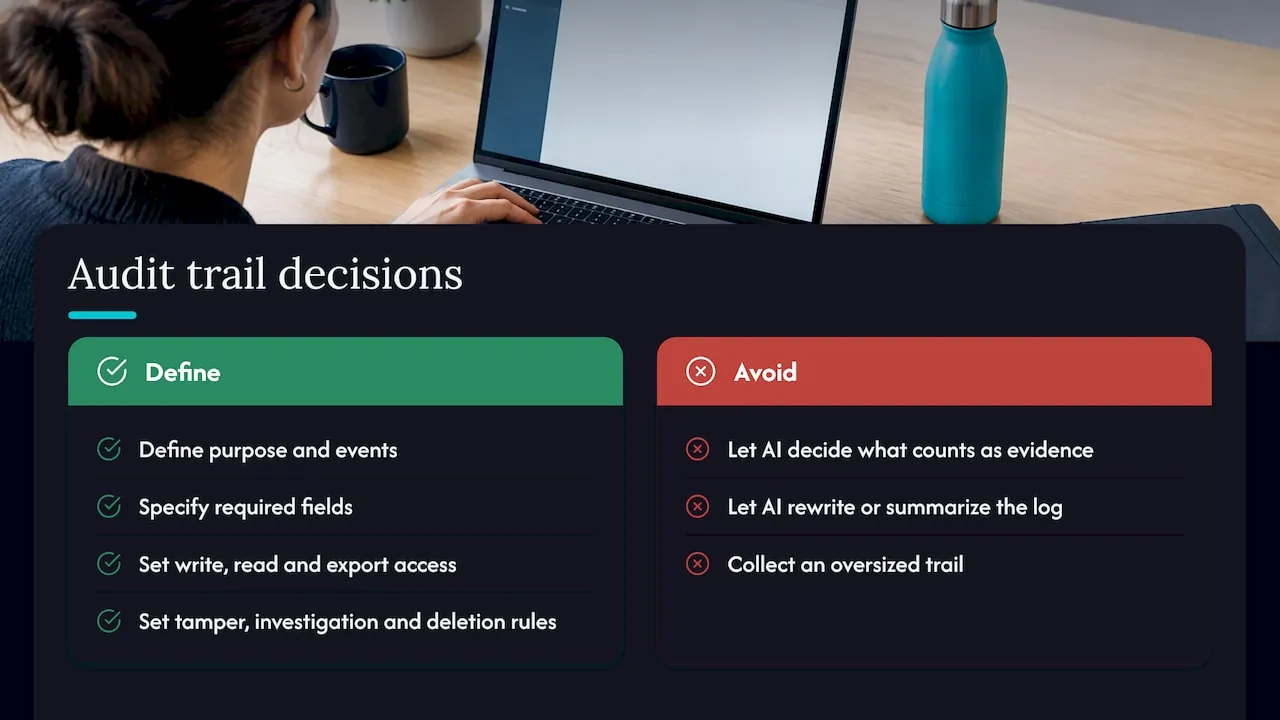
This is also where AI does not belong in the loop: do not have an AI model decide what counts as evidence, or edit or summarize the log in place of the record. The trail is the source of truth that AI reads from, never something AI rewrites.
2. Emit typed events where the action becomes final
The producer should create the event at the point the action is committed, not in a batch job later. A shared handler then validates schema, time and required fields, so every system produces the same shape. Free-text log lines are the usual reason trails cannot be searched.
3. Make the store insert-only
An audit log has one write pattern: insert. Invoance’s engineering guide argues this should be a hard database constraint, for example Postgres triggers that reject updates and deletes, with retention deletes going through a single explicit, audited path. Partitioning the table by month from the start keeps queries fast as it grows.
4. Separate roles and protect a copy
The H-Studio guide lists controls beyond an insert-only interface: separate roles for application, operations and audit review; no update or delete rights for the normal application identity; a copy in a separate security boundary; hash chaining or digital signatures; and recorded, alerted access to the audit data itself. Google’s Cloud Logging best practices add least-privilege access through roles and field-level controls that hide sensitive fields, such as an email address, from most users.
5. Make it searchable and monitored
A trail nobody reads detects nothing. Set alerts that separate events needing immediate investigation from low-priority ones, as Google’s documentation recommends, and make sure you can answer a question like “all exports by this user in the last 90 days” in seconds, not days.
6. Set retention and test it
Decide retention per evidence type (see the next section), then test restores and integrity regularly. H-Studio also suggests a mock audit: a colleague reconstructs a real test case using only the intended evidence. If they cannot, a field is missing.
Retention: what the rules say
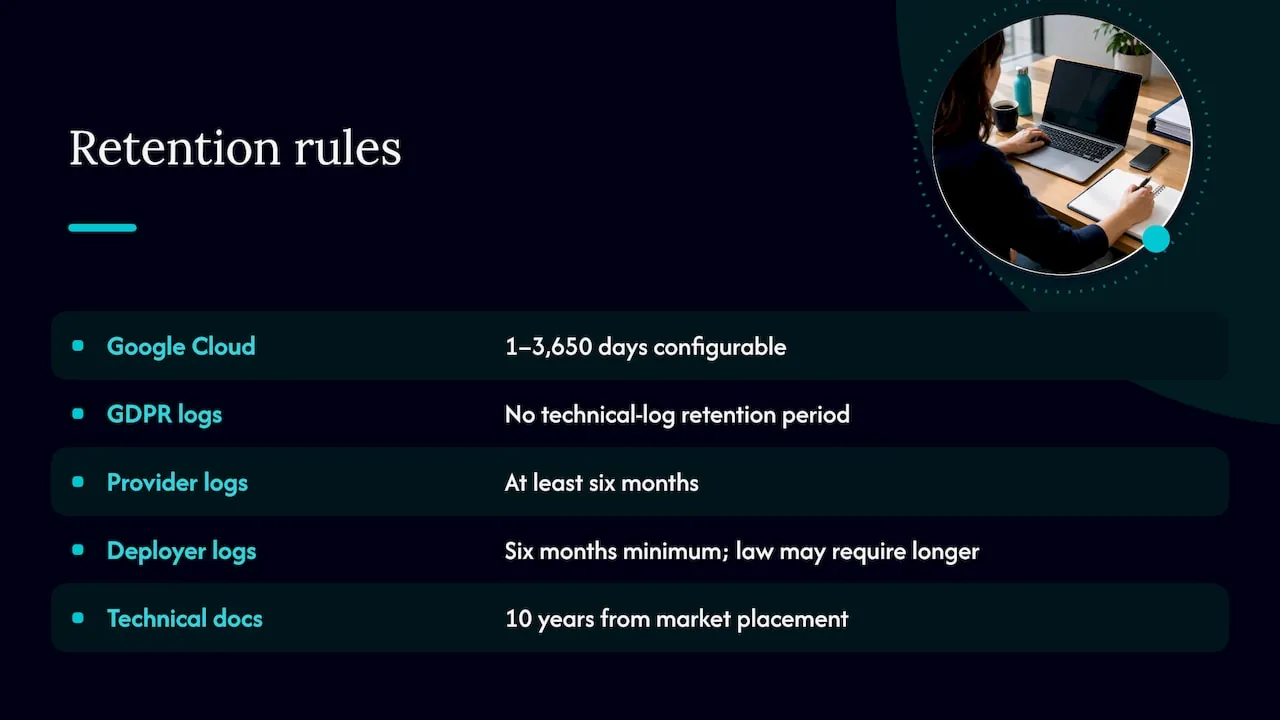
There is no single number. Google Cloud lets you configure log retention between 1 and 3,650 days, so the tooling will not decide for you. The legal anchors for a European SaaS company are these.
GDPR. Article 30 requires each controller to maintain a record of its processing activities, covering items such as the purposes of processing. It sets no retention period for technical logs. The general principle is to keep personal data no longer than necessary for its purpose, so each log type needs a documented reason and a deletion rule. For a plain-language view of how GDPR applies to AI use, see our overview of GDPR and AI.
EU AI Act. Article 12 requires high-risk AI systems to technically allow automatic recording of events over the system’s lifetime. According to Hunton’s guide for in-house lawyers, providers must retain logs under their control for a period appropriate to the system’s intended purpose, at least six months, and technical documentation for 10 years from placement on the market. Deployers of high-risk systems have a related duty to keep automatically generated logs for at least six months, unless other EU or national law requires longer, as summarized by sota.io. Whether your product or your internal AI use counts as high-risk depends on the use case, which is a question for your legal adviser. Our piece on Articles 4 and 50 of the AI Act covers the AI literacy and transparency duties that apply more broadly to SaaS firms.
NIS2. The directive on network and information security expects security measures proportionate to risk, and good logging supports that. Whether your company falls in scope depends on sector and size, so check with counsel rather than assume.
Other frameworks your customers may ask about carry their own minimums. The same sota.io-style playbooks and the customer contracts you sign often drive the real number. Write down the longest requirement that applies to each log type and use that, then delete on schedule.
Audit trails when AI agents act on your data
This is where many SaaS teams are exposed. People already use AI assistants to read the CRM, draft finance reports or update records, but nobody has defined what those assistants may touch, and nothing records what they did. A trail built for human users misses this.
Treat an AI agent as an actor, with its own identity and permissions, and record:
- which agent acted and on whose request,
- which records it read and which it changed, with before and after values,
- whether a human approval was required and who gave it,
- the result, including refusals and failures.
Two design rules follow. First, an agent only does what its permissions allow, and sensitive actions such as changing a payment detail or provisioning access wait for approval. Second, the agent reads from one agreed version of the data. If CRM and finance disagree, the agent will confidently act on the wrong figure and the trail will faithfully record a bad decision. Fixing the data comes before adding the agent.
AI also does not belong where the decision needs accountable human judgment and no one is set up to review it: contract terms, legal positions, hiring decisions or anything touching individuals’ rights. An agent can prepare the information. A named person decides, and the trail shows it.
Common mistakes
- Logging everything. Volume hides signal and creates privacy exposure. Log by evidence need.
- Logs the application can edit. If the same identity that writes the data can delete its history, the trail proves little.
- No reader. Alerts and periodic review matter as much as storage.
- Per-tool trails with no link. Each tool has its own log, so a cross-system transaction cannot be reconstructed.
- Treating the trail as a compliance guarantee. An audit trail supports your obligations under GDPR, NIS2 and the AI Act. It does not by itself satisfy them.
Where NordOps Consulting fits
If your team already uses AI but nobody owns it, the audit trail is a symptom: no one decided what AI may read, what it may change and who approves. Our Fractional Chief AI Officer is one named person with 25 years of operational leadership who decides where AI pays, makes your CRM and finance data the source of truth, and builds agents your people use in plain language to look up, report and update records within permissions, with approval where needed and an audit trail. GDPR, NIS2 and the EU AI Act are design requirements from the start, and build, pilot and testing run on self-hosted European infrastructure in Germany. You can see how the agents work on our AI agents for Finance, Sales and Customer Success page, and how the Processor turns system data into one agreed version, with the Admin Portal alongside. If your architecture is event-driven, our note on where event-driven design does not belong is a useful check on scope.
The AI Readiness Assessment, from €4,500, is the usual starting point to see where your data, permissions and logging stand before anything is built. The Fractional Chief AI Officer retainer starts from €1,500 a month (Advisor), from €3,250 (Operating) and from €5,500 (Embedded).
To discuss your situation, book the free 30-minute discovery call through our AI Readiness Assessment page.
Our perspective
Most audit trail projects fail for an organizational reason: nobody owns the question “what did our systems, and our AI, do on our behalf?” Tools can store events. They cannot decide which events matter.
We work in a fixed order. The data foundation comes first: CRM and finance data as the source of truth, with one agreed version of each record. The AI layer comes second, connecting that data to the assistant your company already uses. Department agents for Finance, Sales and Customer Success come third. When the order is respected, the audit trail is a by-product of the design, because every read and every change passes through a permissioned path that records it.
We also adopt AI one process at a time, starting with the most expensive one. That keeps the scope of the trail small enough to review, and it gives your team time to learn what a useful record looks like before the next process is added.
The strategy and the working system should not drift apart, which is why the person who decides where AI pays is also the person who builds it. Everything built is yours: source code, documentation and infrastructure transfer to you, on terms set in each contract.
Claus Nielsen
FAQ
What is the difference between an audit trail and an audit log?
An audit log is a chronological record of events from one source. An audit trail correlates several logs so you can follow one transaction from start to finish. You need both: logs for the detail, the trail for the story an auditor or customer asks about.
What should an audit trail record at minimum?
Who acted, what they did, to which record, when, from where and with what result. For changes, store the old and new values. Leave out passwords, tokens, keys and card data, and consider whether the entries reveal personal data.
How long should we keep audit logs?
It depends on the purpose. GDPR sets no fixed period but expects personal data to be kept no longer than necessary. For high-risk AI systems, the EU AI Act sets at least six months for logs under the provider’s or deployer’s control. Customer contracts may require more. Confirm the rules for your case with your legal adviser.
Do AI agents need their own audit trail?
Yes. An agent that reads or changes business data is an actor like any employee. Give it its own identity, limit it by permissions, require approval for sensitive actions and record each step with before and after values.
Sources
- NIST CSRC glossary: audit trail
- NIST ITL Bulletin, March 1997
- Datadog: What is audit logging?
- Indiana University IT-12 Audit and Accountability Standard
- Texas A&M System: AU-03 Content of Audit Records
- SaaS audit log design guide
- H-Studio Berlin: SaaS audit trails
- Invoance: How to build audit logs for a SaaS app
- Google Cloud Logging best practices
- GDPR Article 30
- EU AI Act Article 12
- Hunton: The EU AI Act guide for in-house lawyers
- sota.io: EU AI Act and GDPR SaaS compliance stack