An operational data warehouse brings current data from your business systems, such as CRM, billing and support, into one place so teams can report on what is happening now, not last month. For a B2B SaaS company with 20 to 200 people, the question is rarely which warehouse product to buy. It is which data must be fresh, how fresh, and who owns the single agreed version of it. Get that right and reporting works. It is also the step that decides whether AI gives your team answers you can trust.
TL;DR
- An operational data warehouse (or operational data store, ODS) holds current data from several systems for day-to-day reporting. A classic warehouse holds consolidated history for analysis.
- “Near real time” usually means minutes, not milliseconds. Human dashboards rarely need more, and faster costs more to run.
- Choose freshness per consumer: a finance review, a sales forecast and an automated action have different needs.
- Agreeing one version of CRM and finance data matters more than the tooling. AI agents read that version, so errors there become wrong answers there.
- Security, logging and access rules apply to the copy of your operational data exactly as they do to the original. That includes GDPR obligations.
Table of Contents
- What an operational data warehouse is
- Operational database, ODS, warehouse: the differences
- How operational reporting architecture works
- What “near real time” means in numbers
- When you need one, and when you don’t
- The trade-offs that decide the design
- Why the data foundation comes before AI
- Where AI does not belong
- Where the data lives
- How we can help
- FAQ
- Sources
What an operational data warehouse is
The term is used loosely. In practice it means a repository that centralizes current operational data from systems such as CRM, accounting and sales, plus external feeds, so you can report on it without querying each system separately.
For a SaaS company the sources are familiar:
- CRM: accounts, contacts, pipeline, renewals.
- Finance: invoices, payments, subscriptions, revenue schedules.
- Product: usage, seats, feature adoption.
- Support: tickets, escalations, health signals.
The value is not the storage. It is that a question such as “which accounts renewing this quarter have open escalations and unpaid invoices?” gets one answer, not three spreadsheets that disagree.
Operational database, ODS, warehouse: the differences
Four terms get mixed up. This is how they separate.
| Operational database | Operational data store (ODS) | Data warehouse | |
|---|---|---|---|
| Purpose | Runs a transaction system, such as your CRM or billing tool | Current, detailed data from several systems for operational reporting | Consolidated, cleansed history for analysis |
| Freshness | Live | Seconds to minutes or hours | Hours to days |
| History | Whatever the app keeps | Short: current or recent data | Long: months to years |
| Typical question | “Update this record” | “What is open today?” | “How did churn trend over three years?” |
The distinctions follow published descriptions: an operational database is built into a transaction system, an ODS pulls detailed transaction data from several systems with frequent updates, and a warehouse is a more static long-term archive. An ODS sits between transactional systems and the analytical warehouse, holding current or recent data refreshed from minutes to hours, for questions like same-day sales or active support cases.
Typical latency ranges are seconds to minutes with days to weeks of retention for an ODS, against hours to days with months to years for a warehouse. An ODS usually resembles the structure of the source systems and suits light operational reporting, while a warehouse applies fuller transformation and keeps large history.
Modern cloud warehouses blur the line. They can provide real-time data availability and may remove the need for a separate ODS. So “operational data warehouse” is best read as a job description, not a product: current, integrated data, reliable enough to run the business on.
How operational reporting architecture works
Whatever the tools, the architecture has the same layers.
- Sources. CRM, billing, product database, support tool.
- Ingestion. Data moves out of the sources. Change data capture (CDC) sends only inserts, updates and deletes, which reduces the volume moved and the load on the network and source systems.
- Processing. Data is cleaned, matched across systems (one customer, one ID) and shaped into agreed definitions.
- Serving. A store that answers queries quickly for the people and tools that consume it.
- Consumption. Dashboards, reports, alerts and AI assistants.
A common layered pattern is an ODS holding near-real-time raw data for operational reports, with downstream layers that cleanse, aggregate and serve. A frequent design feeds transaction databases into queues and then into warehouse layers, so reporting does not slow down the systems your team works in. That separation is the main reason not to point dashboards straight at your CRM or billing database.
If your systems already publish changes as events, the same flow can ride on that. Our guide to event-driven architecture shows how it works and where it fits.
What “near real time” means in numbers
Most teams asking for real time need something more modest. One practitioner framework gives freshness tiers of sub-second, seconds to about a minute, and minutes to daily. Another describes near real time as roughly one to 15 minutes, using micro-batches or CDC.
Two real examples show what is achievable:
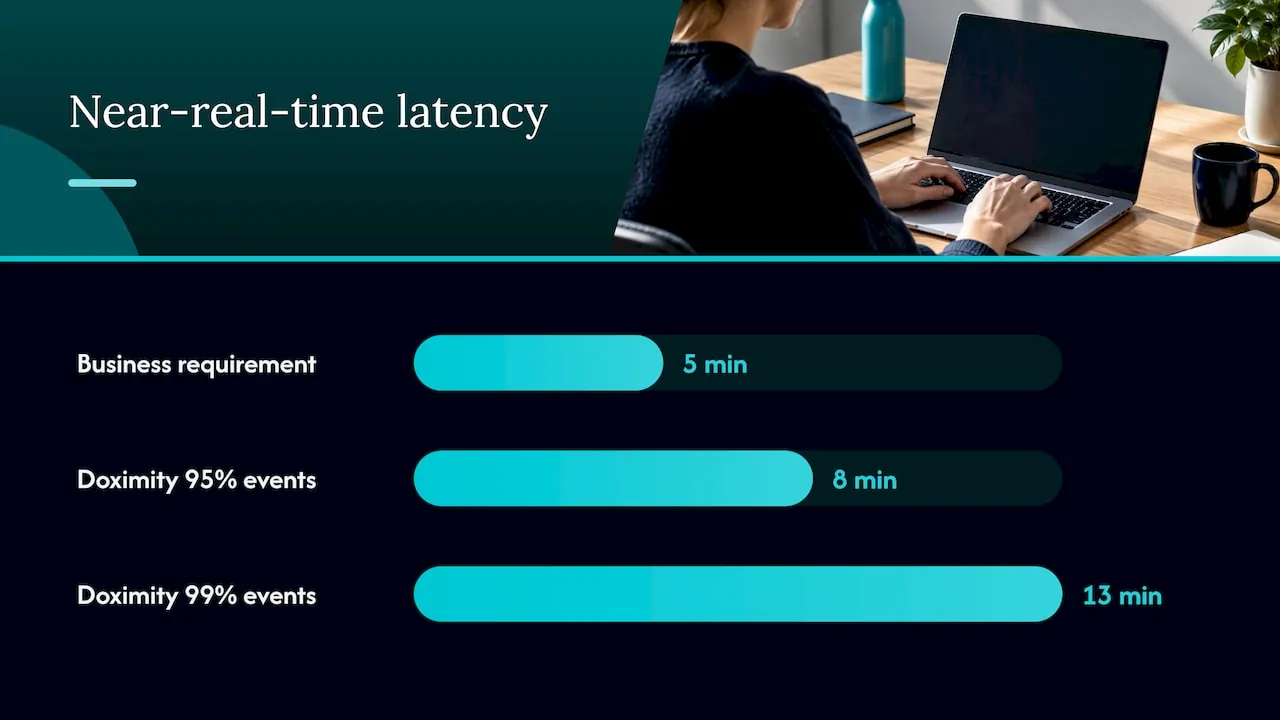
- An engineering team at Doximity reported that its CDC pipeline made changes queryable in minutes. Over a 12-day sample, 95% of events reached the queryable layer within eight minutes and 99% within 13 minutes.
- A university thesis built a CDC pipeline with average end-to-end latency of 0.6 seconds at about 30,000 records per second, while noting that the business reporting requirement was five minutes.
The second example is the useful one. Engineering can beat the requirement by a wide margin, and the extra speed buys the business nothing.
There is also a difference between acting on data in motion and querying data that recently arrived. Automated fraud or pricing actions may need the former, while human dashboards commonly need only recent data. A sales leader reviewing pipeline or a finance lead checking collections is a human dashboard.
When you need one, and when you don’t
Time-sensitive operational decisions are the case for it. Research on operational data warehousing lists inventory, staffing, demand forecasting and performance dashboards as examples supported by intraday or hourly data. Common reporting uses include live sales dashboards, order fulfilment, unified customer views and monitoring.
A dedicated operational serving layer is justified when warehouse refresh lag is too slow for live dashboards, fraud checks or AI context, and unnecessary when all consumers are analysts and hours or days are acceptable.
For a 20 to 200 person SaaS company, a workable rule:
- Weekly or monthly management reporting: a daily refresh into a consolidated store is enough.
- Account management, renewals, collections: hourly or minutes-level freshness across CRM, finance and support is where the value sits.
- Automated actions that change records or trigger processes: freshness plus permissions and approval, covered below.
- Sub-second streaming: rarely justified at your size.
The trade-offs that decide the design
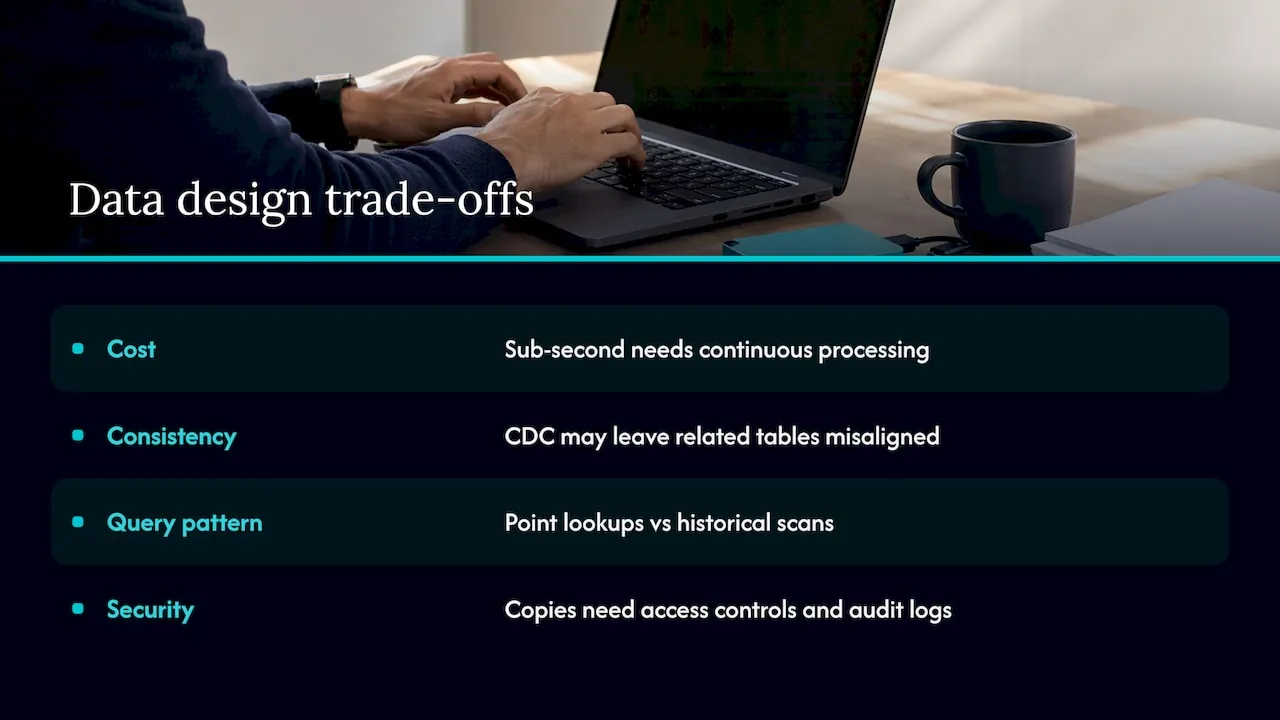
Cost follows latency. Sub-second freshness needs continuously running ingestion, processing and low-latency serving, while batch can stop when idle. Streaming also takes skills in schema changes, lag monitoring, late data and recovery. The advice is to choose the lightest stack that meets the consumer’s requirement, and to set that requirement in writing before you build.
Fresh is not the same as consistent. CDC can make each table fresher without guaranteeing that related tables reflect exactly the same moment. An invoice total and a subscription record can briefly disagree. Decide which reports need a consistent snapshot and which can accept a small lag.
Query patterns differ. A streaming layer precomputes small result sets for point lookups, while a warehouse scans history for ad hoc analysis. Their costs follow different drivers, so the access pattern should guide the choice.
Security travels with the data. A replicated copy is not an informal copy. Recommended controls include role, table, column and row-level access, encryption at rest and in transit, audit logging and lineage tracking. If the data includes personal data of EU customers, GDPR applies to the copy in the same way. Your data protection officer or counsel should confirm what that means for your setup, because this article is not legal advice.
Why the data foundation comes before AI
Most SaaS teams that ask about an operational data warehouse have a second motive: they want AI to answer questions about the business. That makes the warehouse question a data quality question.
An AI assistant that reads two systems with two definitions of “active customer” gives two confident answers. The fix is not a better model. It is agreeing which system is the source of truth for each fact, usually CRM for the customer and finance for money, and cleaning the data to match. We cover that in CRM and data foundation before AI agents and in our data integration strategy guide for SaaS teams.
The order we work in is:
- Data foundation. CRM, the systems around it, and the Processor that turns the data into one agreed version of the truth. The Processor is where that work sits.
- AI layer. MCP connects that data to the AI assistant your company already uses.
- Department agents. Purpose-built agents for Finance, Sales and Customer Success, which your people use in plain language to pull data (ask, report, look up) and push data (update records, trigger processes, provision access), within permissions, with approval where needed and an audit trail. See AI agents for Finance, Sales and Customer Success.
The finance side is where fresh, integrated data pays off first. Collections, cash forecasting and budget tracking all depend on billing, CRM and bank data agreeing. For concrete examples of finance dashboards and decisions, look at how cash-flow forecasting and performance reporting depend on current numbers.
Where AI does not belong
Being explicit here saves money.
- Where the data is not agreed. If sales and finance disagree on revenue, fix the definitions first. AI on top only hides the disagreement.
- Decisions that need sub-second action on money or access without approval or an audit trail. Keep a person in the loop.
- Legal judgment. AI can prepare information. It does not decide what GDPR, NIS2 or the EU AI Act require of you.
- Processes that are cheap and already work. AI is adopted one process at a time, starting with the most expensive one, not the most fashionable.
NIS2 is the EU directive on network and information security, and the EU AI Act sets obligations by the risk level of an AI system. Both are best treated as design requirements from the start, with logging, access control and documentation built in. No tool or architecture guarantees compliance on its own.
Where the data lives
For European SaaS companies the location of the copy matters as much as its structure. When we build, pilot and test, we use self-hosted European infrastructure in Germany, and what we build transfers to you: source code, documentation and infrastructure. See custom operational software, hosted and owned in the EU and why owning your operational systems avoids lock-in.
Our view
A data warehouse is a means. The goal is that your CRM and finance data agree, that the people who run Finance, Sales and Customer Success can ask a question in plain words and get an answer they trust, and that someone owns the result.
That is why we build in a fixed order: the data foundation first, then the AI layer that reads it, then department agents. Reverse the order and you get fast answers on data nobody has agreed on. Different freshness for different consumers is a design decision, and it should be made by one person who understands both the strategy and the system, which is the role of a Fractional Chief AI Officer with operational experience.
We start with the most expensive process, measure it, and build only where AI pays.
Claus Nielsen
How we can help
If AI is already in use in your company but nobody owns it, start with a view of where it pays and what your data can support. The AI Readiness Assessment starts from €4,500 as a one-off. If you want one named person to own AI on an ongoing basis, the Fractional Chief AI Officer retainer starts from €3,000 per month. You can also book a free 30-minute discovery call through our site.
Builds are priced either as 30% of the first-year saving, once measured and proven, or at a fixed price agreed before work starts. See pricing for details.
FAQ
Is an operational data warehouse the same as an operational data store?
Not exactly, though the terms overlap. An ODS holds current, detailed data from several systems for operational reporting. A warehouse keeps consolidated history for analysis. Some modern warehouses cover both jobs, so teams often use “operational data warehouse” for one system that does both.
How fresh does reporting data need to be?
Match it to the person or system using it. Humans reading dashboards usually need data that is minutes to hours old. Only automated actions on fast-moving data tend to need seconds. Set the requirement before choosing tools, because every step toward real time raises running cost and operational effort.
Can I report directly from my CRM or billing system?
For a single system and a small team, yes. Once you combine CRM, finance and product data, or heavy reporting starts to slow the systems people work in, a separate layer keeps reporting apart from day-to-day transactions and gives you one agreed set of definitions.
Does an operational data store make me GDPR compliant?
No tool does that by itself. A copy of personal data is still personal data, so access control, logging and a lawful basis apply to it. Talk to your data protection officer or legal counsel about your specific setup.
Sources
- Operational data store overview
- Operational data store vs. data warehouse
- Data warehouse types and architectures
- Operational data stores: purpose, benefits and use cases
- Modern approach to the operational data store
- HTAP system architecture design
- How to design a real-time analytics architecture
- Real-time analytics: when you need it and when you don’t
- From batch snapshots to near-real-time data
- Near-real-time data pipeline using change data capture
- TDWI operational data warehousing report
- Operational data layer vs data warehouse
- Fractional CFO and financial reporting services