Change management automation means using software to handle the routing, approvals, evidence capture and follow-up of change, so people spend their time on the decisions that need judgment. It can be applied to IT changes (releases, configuration, access) and to the people side of change (adoption, training, communication). For a B2B SaaS company, the practical answer is the same in both cases: automate the predictable steps, keep humans on judgment and exceptions, and fix the underlying process and data before you add any AI.
This guide is written for founders, COOs and heads of Finance, Sales and Customer Success at SaaS companies of roughly 20 to 200 people. It covers what the term means, which workflows are good candidates, where automation does not belong, and how to run a digital transformation so the change sticks.
TL;DR
- Change management automation covers two different jobs: automating how changes are approved and recorded, and managing how people adopt automation. You need both.
- Standard, repeatable changes suit end-to-end automation. Anything touching customer data, financial approvals or compliance needs a human checkpoint.
- Fix the process and the data first. Automating a broken approval chain produces wrong answers faster.
- Adopt one process at a time, starting with the most expensive one, and measure it against a baseline you set before you build.
- Treat GDPR, NIS2 and the EU AI Act as design requirements from the start. None of them is satisfied by a tool alone.
Table of Contents
- Two meanings of change management automation
- Which parts of change management can be automated
- Where AI and automation do not belong
- Change management for digital transformation: the order matters
- Perspective
- A five-stage plan you can run in a quarter
- Workflows worth automating in Finance, Sales and Customer Success
- Governance, privacy and compliance controls
- How to tell whether it is working
- Where to start
- FAQ
- Sources
Two meanings of change management automation
Search results for this term mix two separate topics, and it helps to separate them early.
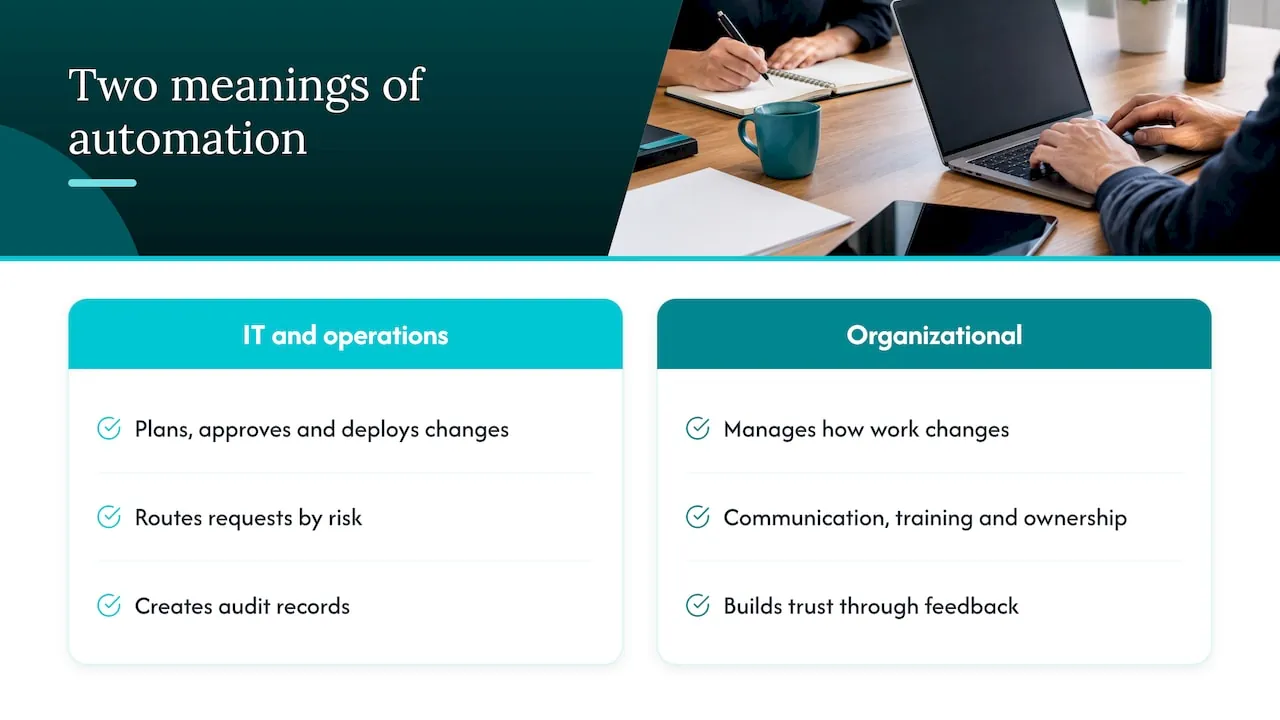
1. Automating the change process itself. This is the IT and operations meaning. Atlassian describes change management as planning, approving and deploying changes with minimal risk and disruption, and notes that fast-moving teams are shifting toward automated, collaborative processes between IT and development. In practice this means a change request arrives, gets classified by risk, is routed to the right approver, leaves an audit record, and is closed without someone retyping it into three systems.
2. Managing the people impact of automation. This is the organizational meaning. When you introduce automation or AI, people’s work changes: who does what, who approves what, what they now trust a system to do. Change management here is about communication, training, ownership and feedback.
SaaS leaders usually face both at once. You automate a finance approval flow (meaning one) and need your team to use it and trust it (meaning two). If you only do the first, you get a tidy workflow nobody follows. If you only do the second, you get enthusiastic people working in manual processes.
Which parts of change management can be automated
The useful question is not “can change management be automated?” but “which changes, and which steps?” InvGate’s workflow guide describes a sensible split: standard changes suit end-to-end automation, normal changes are automated with structured checkpoints that keep decisions with people, and emergency changes are automated with tighter guardrails that capture justification, apply expedited approval and require a post-implementation review.
A small SaaS company can apply the same logic to its own operations:
| Change type | Examples in a SaaS company | Automation level | Human role |
|---|---|---|---|
| Standard, low risk | Provisioning access for a new hire, updating a CRM field after a signed contract, creating an invoice record from a closed deal | Fully automated, logged | Spot-check samples |
| Normal, moderate risk | Changing a pricing rule, altering a renewal workflow, adding a new data source to reporting | Automated routing, evidence gathering and drafting | Approves or declines |
| High risk or sensitive | Anything that touches customer personal data, financial approvals, credit notes, compliance records | Automated preparation only | Decides and signs off |
| Emergency | Access revoked after an incident, urgent fix to a billing error | Expedited path with mandatory justification | Approves, then reviews afterward |
The table is a starting framework, not a standard. Your own risk categories should come from your contracts, your regulators and your own incident history.
What automation does well
- Routing. Sending each request to the right approver based on type, value or risk, without a person acting as the switchboard.
- Evidence capture. Recording who asked, who approved, what changed and when, as a by-product of the work.
- Closure and record updates. Closing a change and updating the system of record is among the steps most ripe for automation, as Digital.ai’s ITIL 4 discussion notes.
- Cross-functional handoffs. A handoff is a state change: a closed deal becomes an implementation task, then an invoice-ready account. Workhint describes this model with stages running from Sales to Operations, Legal, Customer Success and Finance. The system carries the process forward so people do not have to remember it.
- Preparing the decision. Lansweeper’s description of an agentic change manager is useful here: the aim is not to remove human oversight, but to make sure people decide with full context, a clear risk assessment and a reasoned recommendation in front of them.
Where AI and automation do not belong
Being explicit about limits is part of doing this well. Here is where we would not put AI in charge.
- Final approval on money. Credit notes, refunds, discounts outside policy, payment releases. AI can prepare the case. A named person approves.
- Decisions about individual people. Performance, hiring and dismissal decisions are not a place for automated routing. Under the EU AI Act, some employment-related uses are classed as high risk, so get qualified legal advice before going near them.
- Sensitive conversations. A 2025 academic study presented at ECIS found that generative AI can support routine tasks, but human involvement is essential for validating results and handling sensitive situations. The same study reports that a poorly formulated email can damage trust built over months. Do not let a model write your reorganization announcement unreviewed.
- Processes nobody understands. If the team cannot describe how a process works today, automation will only hide the confusion. Map it first.
- Unowned data. If the CRM and finance system disagree about what a customer is, an AI assistant will answer confidently from whichever it reads. Fix the source of truth first.
- The implementation step in another system. Even a mature workflow tool controls the paperwork, not the action. Entroid points out that between Approved and Implemented, a person in a separate console does the real work, and the platform cannot see it. Design controls for the action, not only the ticket.
Change management for digital transformation: the order matters
Most digital transformation advice treats technology rollout and change management as parallel tracks. In a 20 to 200 person SaaS company, they work better as one sequence. This is how we structure it at NordOps Consulting, in this order.
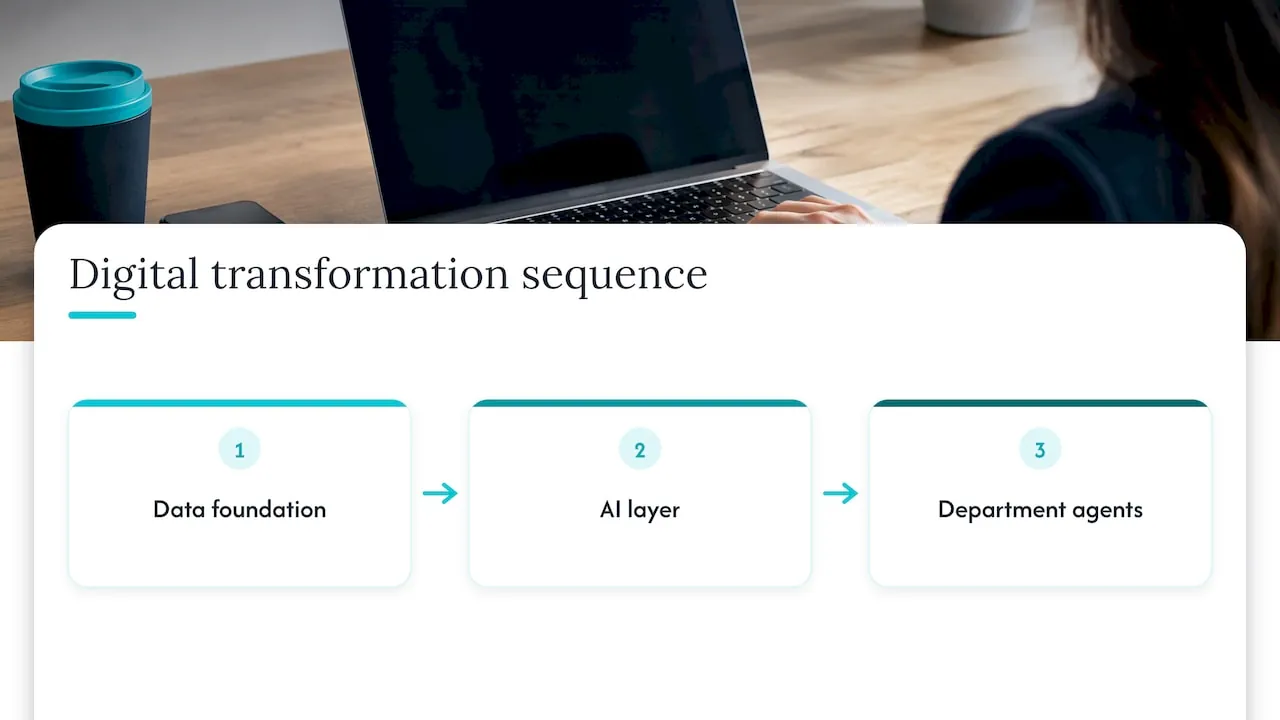
1. The data foundation
Start with your CRM, the systems around it, and the finance data. The goal is one agreed version of the truth: what a customer is, what they pay, what stage they are at, who owns the account. Without this, every later change multiplies inconsistency. This is also the cheapest stage to get people involved, because everyone has a story about the spreadsheet that disagrees with the CRM.
2. The AI layer
Once the data is trustworthy, connect it to the AI assistant your company already uses, with defined permissions on what it can read. Many SaaS teams already use AI informally. The change here is moving from individual, unmanaged use to a shared, governed setup where the assistant reads the same source of truth as everyone else.
3. Department agents
Only then build purpose-built agents for Finance, Sales and Customer Success. These are agents your own people use in plain language to pull data (ask, report, look up across CRM, finance and product) and push data (update records, trigger processes, provision access), within permissions, with approval where needed and an audit trail. You can see how this works on our page about AI agents for Finance, Sales and Customer Success.
Adopt one process at a time, starting with the most expensive one. A single process gives you a clean before-and-after comparison, a small group to train, and a contained place to learn what breaks. Our AI adoption method describes this approach in more detail.
Perspective
Most of the companies we talk to do not have an automation problem. They have an ownership problem. AI is already in use, in sales emails, in support replies, in finance spreadsheets, and nobody is accountable for where it is used, what data it sees, or whether it pays for itself.
In our experience, change management fails when the strategy lives with one person and the build lives with another, and the two drift apart. That is why we run the work as one role: a Fractional Chief AI Officer who decides where AI pays and then builds it, drawing on 25 years of running operations.
Our view is simple. Fix the data first, so the CRM and finance system are the source of truth. Connect the AI your people already use. Then build agents that do real work inside permissions, with approval and an audit trail. Pick the most expensive process first, and do not move on until it works.
The client owns what we build: source code, documentation and infrastructure transfer at handover. People adopt systems they understand and control, and ownership is part of that.
Claus Nielsen
A five-stage plan you can run in a quarter
This plan combines the habits that appear most often in credible guidance on automation change: fix the process first, explain the reasons, work in small iterations, and keep humans in the lead for judgment and exceptions.
- Pick the process and baseline it. Choose the most expensive process, by hours, error rate or delay. Record how it performs today. Without a baseline, you cannot show it improved.
- Map the change impact. List every role that touches the process, what changes for each, and who loses a task, gains one or gets a new approval duty. Name one owner for the outcome.
- Fix the process, then the data. Remove steps nobody needs. Resolve conflicting records. Only then automate.
- Pilot with a small group. Training should look like real work. Cogniver’s guidance suggests requesters submit complete cases, operators verify outputs and resolve exceptions, managers review overrides and samples, and technical owners rehearse failures and rollback. We think that is a sound pattern for any agent rollout.
- Roll out, then feed back. Capture exceptions, overrides and time saved, and revise the process from that evidence. An automation with no feedback loop slowly drifts away from how the business actually works.
Budget for the people side as well as the software. Include a named change lead, training material and a support channel for the first weeks after launch. A business case that counts only hours saved will underfund the work.
Communication and involvement
- Explain why the change is happening and what it means for each role, in a two-way conversation rather than a single announcement.
- Involve the people who do the work in designing the approval steps. They know where the exceptions are.
- Say clearly what the agent can do and what it cannot, so nobody assumes it has authority it does not have.
- Keep a visible human owner for every automated process.
The ACMP’s 2025 white paper reaches a similar conclusion: AI can automate tasks such as stakeholder analysis and impact assessment, but its insights complement human expertise in change leadership rather than replace it. It also recommends AI ethics committees to reduce bias and improve transparency. In a smaller company, a short standing review with a named lead can serve the same purpose.
Workflows worth automating in Finance, Sales and Customer Success
The best candidates are repeated, rules-based and data-heavy, with a clear owner. These examples are typical for SaaS operations. They are illustrations of the pattern, not claims about any specific client.
Finance
- Pulling and reconciling billing and CRM records before month-end.
- Preparing an invoice-ready package from a closed deal, for a person to approve.
- Flagging mismatches between contract value and invoiced value.
Sales
- Updating CRM records after calls and signed contracts.
- Creating the handoff to implementation when a deal closes.
- Answering pipeline questions in plain language from live data.
Customer Success
- Looking up an account’s usage, billing and support history in one question.
- Triggering onboarding steps and provisioning access. Our article on onboarding automation for B2B SaaS goes through what to automate and what to leave to people.
- Preparing renewal briefs ahead of a customer call.
A useful test for any candidate: could a new employee follow written rules to do this task correctly? If yes, it is probably automatable. If the answer depends on reading the customer’s mood or weighing a relationship, it stays with a person.
Governance, privacy and compliance controls
Low-risk, well-understood steps can run unattended. Anything touching customer data, financial approvals or compliance needs a human checkpoint. Beyond that principle, a few controls do most of the work:
- Permissions. Each agent can read and write only what its role requires.
- Approval where needed. Defined thresholds above which a person must approve.
- Audit trail. Every action recorded: who asked, what the agent did, who approved.
- A floor of human review. A defined set of changes that always get human risk review, whatever the automated score says.
- Version control and testing. Treat workflows and agent configurations as artifacts that are versioned and tested before release.
On regulation, speak in general terms and involve counsel for specifics. GDPR governs how personal data of people in the EU is processed. NIS2 sets cybersecurity and risk management expectations for certain organizations and sectors across the EU. The EU AI Act regulates AI systems by risk category and sets obligations that differ by category and by your role. Whether and how each applies to your company depends on your facts, so this article is not legal advice, and no tool or design choice guarantees compliance. What we can say is that designing with these rules in mind from the start is far cheaper than retrofitting. Our build, pilot and testing run on self-hosted European infrastructure in Germany for that reason. For a deeper look, see our AI governance framework for B2B SaaS.
How to tell whether it is working
Forrester has reported that the change process is increasingly automated and that organizations which streamlined it were much more likely to report superior business performance. That supports measuring the process itself, not just the tool.
Track a small set of measures against the baseline you recorded:
- Cycle time of the automated process, from request to completion.
- Exception and override rate, which shows where the agent or the process is weak.
- Rework and error rate in the records the process touches.
- Adoption, meaning how many people actually use the agent weekly, not how many have access.
- Cost saved, measured after the system has run long enough to be credible.
That last point shapes how we price builds. Builds are priced at 30% of the first-year saving, once measured and proven, or at a fixed price agreed before work starts. The measurement comes first, so you and we are looking at the same number.
Where to start
If AI is already in use in your company but nobody owns it, the first step is an honest picture of where it is used, what data it touches and which process costs you most. We offer a free 30-minute discovery call to talk through that.
For a structured starting point, the AI Readiness Assessment is available from €4,500 and gives you a view of your data foundation, your AI use and your priorities. If you want continuing ownership, the Fractional Chief AI Officer retainer starts from €1,500 per month. One named person decides where AI pays and builds it, and you own what is built.
We are an AI consultancy based in Fuengirola, Spain, serving growth-stage B2B SaaS companies in Europe. You can also review the Admin Portal that sits alongside the agents, where approvals and permissions are managed.
FAQ
Can change management be automated?
Partly, and deliberately. Routing, evidence capture, record updates and closure can be automated reliably. Judgment calls, sensitive communication and approvals on money or customer data should stay with people. The practical aim is to give those people better context, not to remove them.
What is change automation?
It is the use of automated workflows and guardrails to plan, approve, execute, record and review changes. It is a set of patterns and integrations rather than one product. It also does not replace human judgment where risk must be assessed.
How is it different from managing the impact of automation?
Change management automation uses software to run the change process. Managing the impact of automation is the people work: communication, training, ownership and feedback. A SaaS company introducing AI needs both, and the second usually decides whether the first succeeds.
Where should a SaaS company start?
Start with the single most expensive process, record how it performs today, and check that the CRM and finance data behind it agree. Then automate one step at a time with a named owner. Add agents for Finance, Sales or Customer Success once the data can be trusted.
Sources
- Atlassian: IT Change Management
- InvGate: Change management workflow
- Digital.ai: ITIL 4 change management and automation
- Workhint: Automate cross-functional task handoffs
- Lansweeper: The Change Manager Agent
- ECIS 2025: GenAI-powered organizational transformation
- Entroid: Change management and the human step
- Cogniver: AI change management strategy
- ACMP 2025 white paper: Navigating the Future
- Forrester: The New Change Management